
Creating Your Policy
What is a Policy?
A Policy is a set of rules that define which users, and how many users must approve a request to recover your backup, and how many of them need to sign off. Think of it as a lock that needs multiple keys, no single person can recover your data alone, which keeps your account safe even if one person's access is compromised or unavailable.
Before You Start
You'll want to know two important factors:
- Who should be involved in approving a recovery (this can be any of your team members with access to your account)
- How many people need to approve - it doesn't have to be everyone. See Best Practices below.
Note: Not every selected member has to approve every request. For example, you can include 5 members but only require 2 approvals, the other 3 are backups in case someone's unavailable.
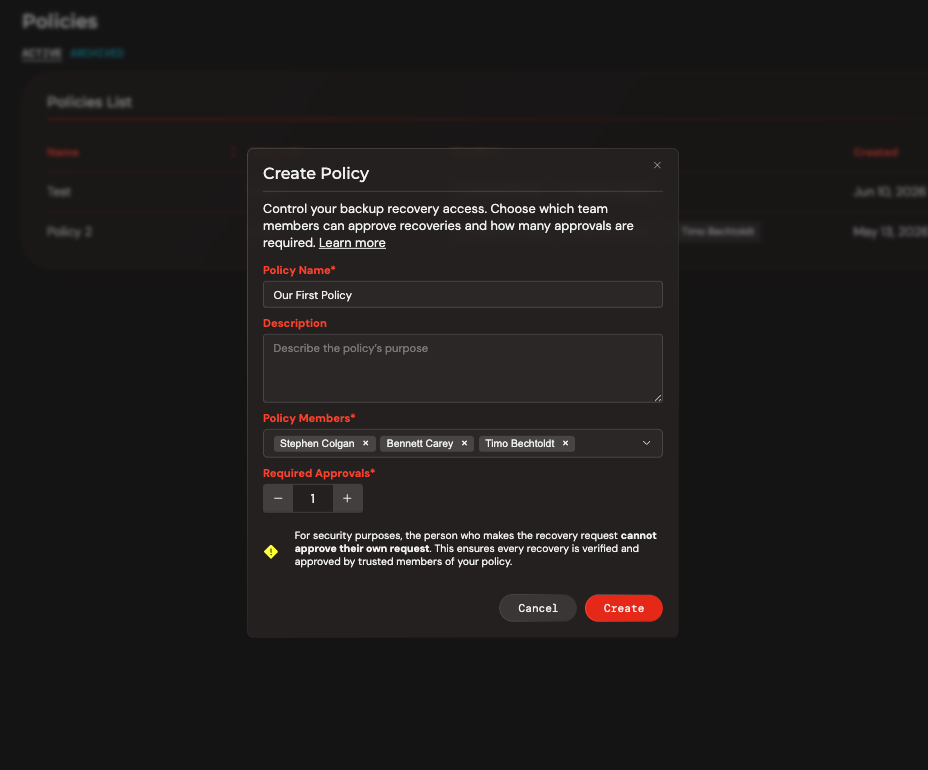
How to Create a Policy
- Go to Policies in the menu
- Click Add Policy
- Give your policy a name
- (Optional) Add a description
- Select the members you want involved and total amount of required approvals
- Click Create
Your new policy will appear in the policy list.
Best Practices
When deciding how many approvals to require (your quorum), keep two things in mind:
- One person requests, the others approve. The person recovering data doesn't count toward the approval number, they're asking, not approving.
- Leave room for someone to be unavailable. If your team has 4 members, avoid requiring 3 approvals (a "3-of-4" setup) — if even one person is out, you're stuck. Instead, aim for a 1-of-4 or 2-of-4 policy. You still get multiple people involved in keeping recovery secure, but you're not blocked if someone is on vacation or unreachable.
Rule of thumb: enough approvers to prevent any one person acting alone, few enough that a request never gets stuck waiting on someone who isn't around.